
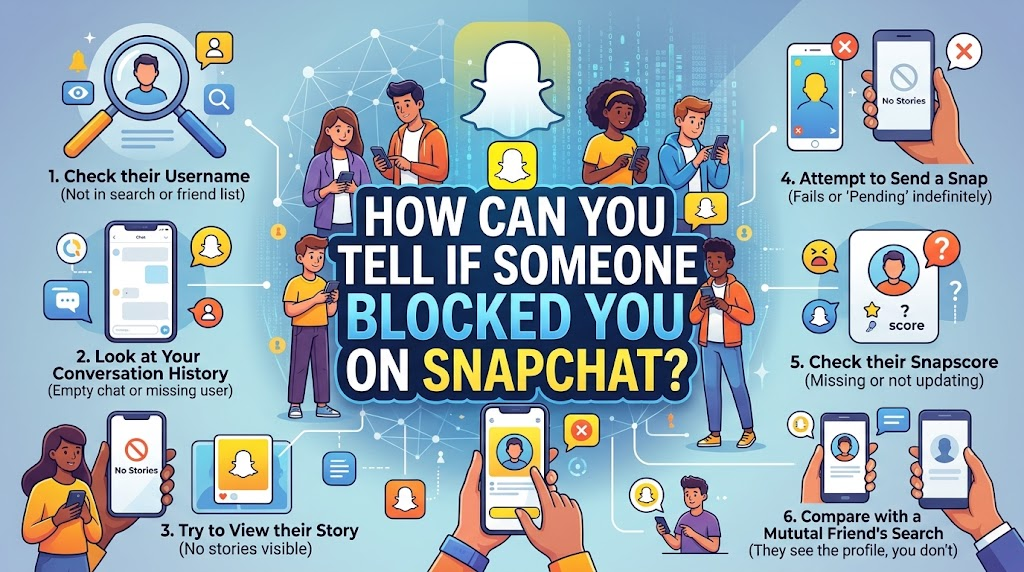

Have you ever sent a fun snap to a friend and waited for a reply, but nothing happened? Days go by, and their name seems to vanish into thin air. It is a strange and frustrating feeling. How Can You Tell If Someone Blocked You on Snapchat You might wonder if they deleted their app, took a break from social media, or if they blocked you.
Do not worry at all! Figuring out the truth does not have to be a giant mystery. Snapchat keeps things a bit quiet on purpose to protect user privacy. However, a few clever detective tricks can help you uncover the truth.
In this easy guide, we will walk through all the simple steps. You will learn how to check your friends list, look up usernames, and spot the hidden clues. Let’s dive right in and solve this tech mystery together!
Check Your Recent Chat History
The very first thing you should do is open up your chat screen. Swipe right from the camera page to see your list of recent conversations. Scroll down until you find the person you are looking for.
If you used to talk to them every single day, their name should be right near the top. But if their name is totally missing from your chat list, that is your first big clue. Sometimes, people clear their chat history, which makes the conversation disappear from view.
Do not panic just yet, because a missing chat does not 100% mean a block. It just means something has changed in your direct line of sight. Keep your eyes open and take a deep breath. We have a few more steps to run through before we can know for sure.
Try Searching Their Exact Username
Next up, let us play detective with the search bar. Tap the magnifying glass icon at the top left corner of your Snapchat screen. Type in the exact username of the person you want to check.
Be very careful to spell everything correctly. Even one tiny typo will ruin your search results. As you type, watch the screen to see what pops up in the drop-down menu.
If their account shows up clearly with their Bitmoji and profile picture, that is great news. It usually means you are still friends, or at least they have not completely cut you off. But if you type their exact name and zero results appear, or it says “No Results Found,” something is definitely up. Take note of what you see and move on to our next clever check.
Look Up Their Display Name Too
People often change their usernames or have tricky spelling. If searching their exact handle did not work, try searching their common display name instead.
Type their real first name or nickname into the search bar. Scroll through the list of public accounts that pop up. If you know their friends or mutual connections, you can sometimes find them hiding in plain sight.
When you cannot find their display name anywhere on the app, it gets a bit more suspicious. A total disappearance from search results often happens when an account is blocked or deleted. Just remember to stay calm. People delete their Snapchat profiles all the time for personal reasons. It is rarely personal against you, even if it feels a little bit sad at first.
Send a Test Message to See What Happens
Are you feeling brave? You can try sending a quick text message or chat to see how the app reacts. Open a chat window with them if you can still find their name in your recent list.
Type out a friendly little message like, “Hey, how is your day going?” and hit send. Watch the little status icon right next to their name very carefully.
Normally, when a message goes through, it turns into a solid smiley face or an arrow that says “Delivered.” But if you notice that your message stays stuck on “Pending” forever, or the little chat arrow stays grey instead of filling in with color, that is a massive warning sign. Blocked messages almost never deliver because the connection has been completely cut off by the other person.
Check If Their Snap Score Disappeared
One of the coolest features on Snapchat is the Snap Score. It is that little number sitting right under a person’s profile name that shows how active they are.
Tap on their profile to look at their public info page. Can you see their score shining brightly underneath their name?
If you used to see their Snap Score every single day, but suddenly it drops to zero or vanishes entirely into thin air, you have found a very strong clue. When someone blocks you, Snapchat hides all their personal stats from your view. A missing score is one of the most reliable ways to confirm your suspicions without ever having to ask them awkwardly.
Look for Their Stories and Highlights
Snapchat stories are a fun way to share daily adventures with friends. When you want to check your friendship status, take a look at the Stories tab.
Scroll down to see if your friend is posting new public stories or sharing highlights from their week. Usually, if they post something, a colorful circle will light up around their name in your feed.
If you know for a fact that they love posting stories every single day, but your feed has been totally blank for weeks, they might have hidden their stories from you. Even worse, if you try to search for their public profile and find zero stories or spotlight videos, a block is looking very likely. Take your time and look closely at your app to be sure.
Try Using a Friend’s Phone for Safety
Are you still feeling completely unsure after trying all our steps? There is one final, foolproof way to check the truth.
Ask a trusted mutual friend if you can borrow their phone for a quick second. Make sure this is a friend who is close to both of you and will not judge your curiosity.
Open Snapchat on their phone and search for your missing person’s username. If their profile pops up instantly, and your friend can see their active stories and Snap Score, then you have your final answer. Sadly, it means your own account has been blocked. If their profile is missing on your friend’s phone too, it means they deleted their entire account. Mystery solved!
Understand the Difference Between Blocking and Deleting
It is very important not to mix up getting blocked with someone simply deleting their app. People take social media breaks all the time to focus on school, work, or real life.
When someone deletes their Snapchat account, their profile disappears from everyone’s search results. It looks very similar to getting blocked, but it is not personal. They just wanted some peaceful offline time.
On the other hand, a block is a deliberate choice. It means they wanted to stop seeing your snaps or messages. Try not to let it hurt your feelings too much. The internet is a big place, and people make choices for all kinds of personal reasons. Keep shining bright and focus on the friends who love talking to you every day!
What to Do If You Really Got Blocked
Discovering that someone blocked you can sting a little bit. It is completely normal to feel confused or bummed out for a moment.
The absolute best thing you can do is take a deep breath and give them plenty of space. Do not try to create fake accounts or badger them through other apps like Instagram or text messaging. That can make things feel awkward and uncomfortable for everyone involved.
Instead, put your energy into hobbies you love. Go outside for a walk, play a fun video game, or chat with other wonderful friends who make you smile. Life is way too short to worry about one missing Snapchat connection!
Stay Safe and Positive Online
Social media is supposed to be a fun and happy place to share silly filters and funny moments. Keeping your online experience positive is all about protecting your own peace of mind.
Remember to be kind to others, respect people’s digital boundaries, and never take online drama too seriously. If someone decides to block you, let them go and keep moving forward with a big smile on your face.
You deserve to surround yourself with people who enjoy talking to you and sharing great memories. Keep your chin up, stay creative, and enjoy all the amazing features Snapchat has to offer!
Frequently Asked Questions
Does Snapchat notify someone when you block them? No, Snapchat never sends a notification to the other person. They will only find out if they notice clues like missing chat histories or disappearing Snap Scores.
Can I still see old chat messages after I get blocked? Usually, your old chat history will vanish from your active chat screen once a block happens, protecting the privacy of both users involved in the conversation.
What does a pending message mean on Snapchat? A pending message means the app tried to send your chat, but it cannot deliver because you are no longer friends or the recipient has blocked your account.
Can I unblock someone if I change my mind later? Yes, you can easily unblock anyone by going to your Snapchat settings, scrolling down to the “Blocked” section, and tapping the little “X” next to their name.
Why did my friend’s Snap Score disappear suddenly? If a Snap Score vanishes, it usually means the user deleted their account, deactivated their profile, or blocked you from viewing their personal information.
Is there a way to bypass a block on Snapchat? No, there is no way to bypass a block. If someone chooses to block your account, you must respect their digital privacy and choice.
Complete Detailing Table
| Feature / Clue | What It Looks Like Normally | What It Looks Like If You Are Blocked |
| Chat History | Name is visible in your recent chat list with active message history. | Conversation thread disappears completely from your active chat window. |
| Search Results | Username pops up instantly with their Bitmoji and public profile info. | Searching their exact handle yields “No Results Found” or a blank screen. |
| Snap Score | Visible right under their profile name with regular live updates. | Score completely disappears or drops down to zero from your view. |
| Stories & Highlights | Colorful ring appears when they post new public content or updates. | No stories or highlights show up, even if you know they post often. |
| Message Status | Shows as “Delivered” with a smiley face icon right after you send it. | Gets stuck permanently on “Pending” with a grey uncolored arrow icon. |